

Why Is My Computer So Slow?
Myths and RealitiesIf your computer takes 15 minutes to reach the desktop, you’ve probably been told to “clean up your files” or “run an optimizer.” As a professional technician, I’m here to tell you that those are myths. While “spring cleaning” your software is great for organization, it rarely fixes a fundamentally slow system. Here is the truth about PC performance and how to actually reclaim your speed.
The Most Common “Slow PC” Myths
-
Myth 1: Deleting photos and documents adds speed. Unless your drive is 99% full, your computer doesn’t care if you have 10GB or 500GB of photos.
-
Myth 2: Uninstalling unused programs is a “magic fix.” Unless a program is actively running in the background, its presence on your disk has zero impact on your processor’s speed.
-
Myth 3: PC “Optimizer” apps work. Most of these apps are “snake oil.” They might shave three seconds off a boot time, but they won’t fix a 15-minute wait.
Identifying the Real Problem: The “Mechanical Bottleneck”
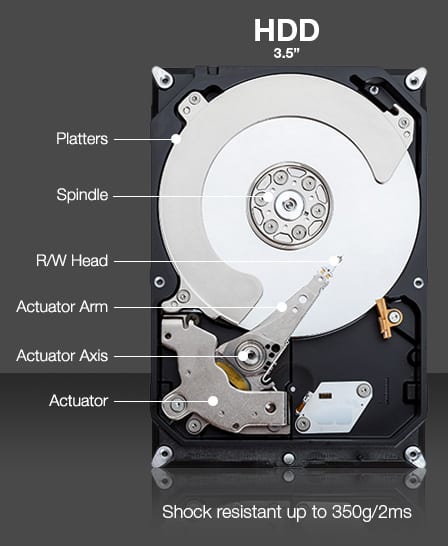
If you experience the following, your software isn’t the problem—your Hard Disk Drive (HDD) is:
-
Programs constantly show “Not Responding.”
-
There is a noticeable delay between typing a key and the letter appearing.
-
The hard drive activity light on your case stays solid red/white.
-
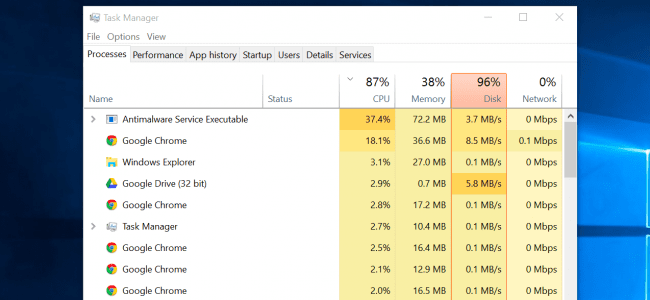
Task Manager shows “Disk Usage 100%” even when you aren’t doing anything.
Tech Insight: Many standard 1TB drives (especially Seagate models) are prone to performance degradation. Even if they pass a “S.M.A.R.T.” health test, they can become “glacially slow” as they age, struggling to read data fast enough for modern operating systems like Windows 10 and 11.
The Real Solution: The Solid State Drive (SSD) Upgrade
The single most effective way to save your computer is to replace the old mechanical hard drive with a Solid State Drive (SSD).
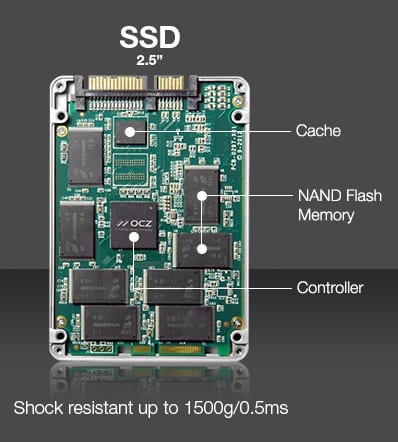
Because an SSD has no moving parts, it accesses data instantly. I have seen computers go from a 15-minute boot time to under 10 seconds just by switching to an SSD.
Why Cloning is the Better Way
When I service your computer, I clone your existing drive to a new SSD. This means:
-
You keep all your files, photos, and settings.
-
Your programs remain exactly where they were.
-
The speed increase is immediate, even without “optimizing” a single file.
SSD vs. HDD: What You Need to Know
| Feature | Traditional HDD | Solid State Drive (SSD) |
| Speed | Slow (Mechanical platters) | Ultra-Fast (Flash memory) |
| Durability | Fragile (Sensitive to drops) | Highly Durable |
| Boot Time | 2–15 Minutes | Under 15 Seconds |
| Maintenance | Needs Defragging | Never Defrag (it wears it out!) |
A Note on Storage: SSDs generally cost more per gigabyte. You may have to choose between a massive amount of storage (HDD) or blazing-fast performance (SSD). For 95% of users, the performance of an SSD is worth the trade-off.
Ready to make your computer feel brand new?
Don’t waste money on “Tune-up” software that doesn’t work. Let’s get a high-speed SSD into your machine and give it a second life.
We’re Tech’n Care Of Business!
Contact us to schedule an onsite service or a quote. We need the full model number of the computer or the part number itself to quote. Every computer is different so many parts need to be researched in order to quote and that can’t be done by brand name alone.
For example, saying you need a screen quote for an HP isn’t helpful but saying you need an N156BGA-EB2 screen is very helpful or an HP Pavilion 15-ec0013dx fan. If you don’t know the part number, I need the model of the laptop which is usually on the bottom of the laptop in small letters, for a dell an express code could be used. Without the brand & model, I won’t be able to give you an accurate quote.
Top Tech Calls
I have compiled answers to the most common calls I get. If it ends up helping you, please consider a donation to help me.
Paypal: https://www.paypal.me/computerguru
Cash App: @southerntabitha
Venmo: Tabitha-Hawk-1
Keep me in mind the next time you need computer repair.

We're Here To Help!
Pay Invoice
You can pay your invoice online now using PayPal at this link below and enter in the total from the invoice.
Paypal: https://www.paypal.me/computerguru
Cash App: @southerntabitha
Venmo: Tabitha-Hawk-1
Mailing Address for Business Correspondence Only (No Store Front Available)
P.O. Box 110132
Nashville, TN 37222
Hours
Mon to Fri – 9:00 am to 5:30 pm
Saturday – 10 am to 3:00 pm
Sunday – Closed
Phone / Text:
615-332-2844